
Slope Failure Mode Analysis
Slope failure mode analysis in hard rock identifies the potential failure modes within a rock mass for each major pit slope. The analysis typically starts by viewing all structure point data in a stereonet chart, contouring the poles, creating average planes for each set of poles, and creating fixed planes for each pit slope. You can then inspect the stereonet plots for potential failure modes.
|
Failure mode |
Stereonet plot example |
|---|---|
|
|
|
|
|
|
|
|
|
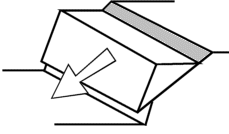
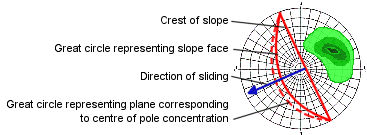
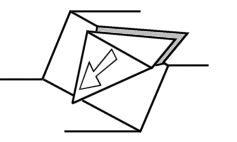
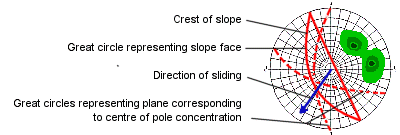
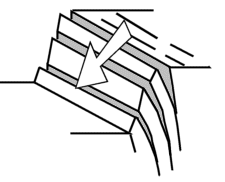
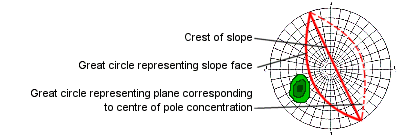
The examples on this page use the following data files from the tutorial data folder, C:\Database\DMTutorials\Data\VBOP\Datamine:
-
_vbgtpts.dm- structure data points file -
_vb_itpitstrings.dm- open pit crest and toe strings
To create fixed planes for slope failure analysis:
-
Insert a stereonet into a plot sheet. See Stereonet Analysis - Exercises.
The Stereonet screen displays.
-
On the Data Selection tab, select _vbgtpts (points) from the Loaded Data list.
-
Select SDIP from the Dip list.
-
Select DIPDIRN from the Dip Direction list.
-
Leave the Key Field column blank.
Note: The Key Field column is used in later examples to show how to create multiple charts by specifying a third data field.
-
Right-click the empty projection on the left to open the context menu.
-
Expand the Show/Hide context menu and select only Contours.
Note: You may need to open the Show/Hide menu more than once to clear the other options.
-
Click Apply.
A pole projection is generated.
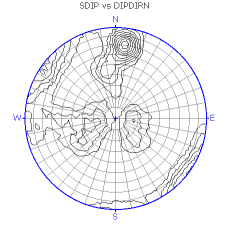
-
Click OK.
The contour plot sheet is generated and the Design window displays.
-
Load
_vb_itpitstrings.dminto memory. -
Create fixed planes for the following major pit slopes:
-
North wall - 184/30
-
East wall - 270/40
-
West wall - 85/35
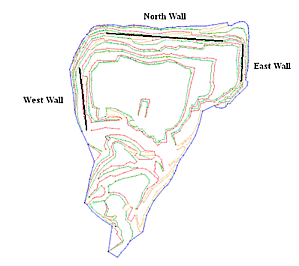
-
-
On the Planes tab, click New Plane to display the New Plane screen.
The pit strings and structure data show the orientations of the pit slopes:
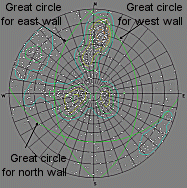
Note: The pit slopes are represented by green great circles, which are fixed planes.
-
Create a friction circle of 20 degrees to check for potential planar failure of structures along the three pit slopes.
The base friction angle, or the dip at which a planar structural feature fails or slides, is different for each set of structural features. The value of 20 degrees is an example.
-
On the Cones tab, click New Cone.
-
Enter a Cone Name.
-
Enter 70 for the Angle. An angle of 70 degrees gives a 20 degree friction circle:
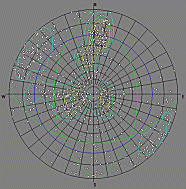
Note: The stereonet plot shows the location of three fixed planes, which represent pit walls, and a blue friction circle of 20 degrees.
-
-
Use the second type of planar failure shown in the failure mode table to check the structure set STYPE = 'B' for potential planar failure on the North wall.
-
Click All Planes Display to display planes for selected poles.
-
Keep the average plane displayed.
-
Select poles in the B set to find structures that display great circles that match all of the following conditions:
-
The great circle lies parallel to the North wall great circle.
-
The dip is greater than the North wall dip.
-
The dip is less than the friction circle, which is the blue circle.
-
-
-
Review the bedding plane structure results.
The great circles of the bedding plane structures, STYPE = 'B', do not plot in the area defined by the magenta oval. The results do not indicate potential planar failure on the North wall.
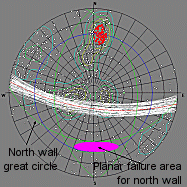
Note: The poles, shown in red, and planes, shown in white, are shown relative to the plot area for structures with potential planar failure on the North wall. The plot area is shown with a magenta oval.
-
Review the selected structures that do indicate potential planar failure on the North wall.
The selected structures, shown as red poles, plot in the area defined by the magenta oval.
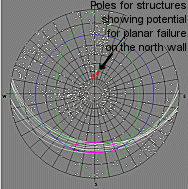
Note: The selected structures, shown as red poles and white great circles, plot in the area for potential planar failure on the North wall. The area is shown with a magenta oval.
-
Check whether these structures are located along the North wall of the pit.
If their X, Y, and Z coordinates lie along the North wall, the structures have the potential for planar failure.
-
View the positions of the selected poles in the 3D window.
-
Zoom into the middle third of the East wall and look for highlighted yellow structure points:
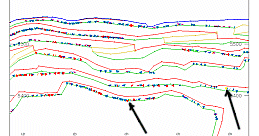
-
-
View these structures relative to the pit walls.
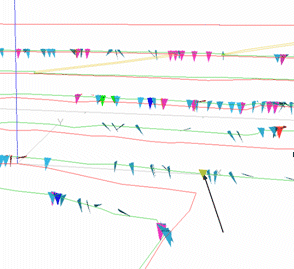
Repeat this procedure for each structure set, each wall, and each failure mode type, such as planar, wedge, and toppling.
Related topics and activities:
